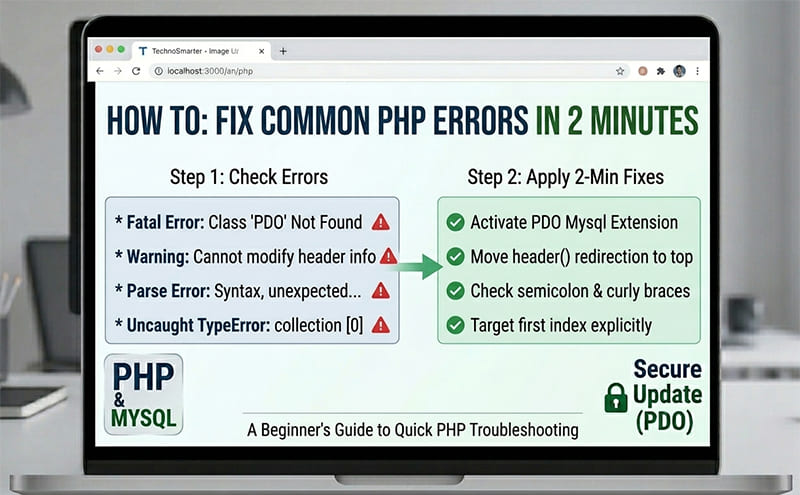
Errors are a distraction in every beginner's programming life. You write PHP code, execute it in the browser, and see a blank page or an error message with a line number. It can demotivate you, and many beginners leave programming just because of these errors. But don't worry about them—every senior developer you look up to still makes these same mistakes.
We will discuss most of the common mistakes and errors. Finding the exact place in the code where the error is coming from is known as debugging. Senior developers also debug their code to resolve issues. Let's look at 10+ of the most common PHP errors that trip up beginners and learn how to fix them in under 2 minutes.
You must be able to see errors on your website page. If you are working on localhost, you usually don't need to add anything to display errors. But if your screen is completely blank, open your PHP file and add these lines right at the very top to turn on error reporting:
<?php
error_reporting(E_ALL);
ini_set('display_errors', 1);
?>
If you have created a database connection or config file, you can add these lines of code there. Beginners often face issues when moving to a live website because, in most hosting panels, errors are disabled by default. You have to enable them or add these lines to see what's wrong, because if you can't see the errors, you can't fix them. After applying this setting, you will see all the errors on your screen. Now that our display_errors option is active, let's fix these 10+ bugs one by one!
1. Parse Error: Syntax Error, Unexpected...
The problem: You forgot a semicolon (;) at the end of a line, or forgot to close a curly brace ({}) or parenthesis (()). PHP gets confused because it doesn't know where your statement ends.
How to fix it: Check the error message on your screen. It usually contains the line number causing the issue.
Fix in 2 Minutes: Open your code in a text editor and go to that specific line. Look at that line and immediately at the end of the line above it. Ensure every statement finishes with a semicolon. Also, check if you have missed a curly brace ({}) or parenthesis (()).
//  CRASHES
echo "Hello World"
$name = "Rahul";

//  FIXED
echo "Hello World";
$name = "Rahul";
2. Fatal Error: Uncaught TypeError (Expected Argument)
The problem: A Fatal Error stops the whole execution of your program. For example, if a Fatal Error appears on line 12 of a 100-line script, PHP will stop executing the page right there. Lines 1 to 11 will execute successfully, but PHP gets stuck at line 12, and no more lines are processed.
This error usually appears when you pass the wrong type of data into a function, or when you forget to provide the correct path to a file. You might see an "Uncaught TypeError," which gives you a hint about what data type the function expected versus what it actually received.
Fix in 2 Minutes:
Check Arguments & Parameters: Check the number of parameters you are passing. For example, if you defined a function with two arguments, but at the time of calling it, you forgot to pass those two parameters, it will trigger a Fatal Error.
<?php
function message($text,$type)
{
echo $text;
echo $type;
}
$text='Hi'; $type=2;
message($text);
?>
Output -
 PHP Fatal error:  Uncaught ArgumentCountError: Too few arguments to function message(), 1 passed in /box/HelloWorld.php on line 9 and exactly 2 expected in /box/HelloWorld.php:3
Stack trace:
#0 /box/HelloWorld.php(9): message()
#1 {main}
  thrown in /box/HelloWorld.php on line 3
You can easily understand it with the error text on your screen, which will tell you something like:
“Too few arguments to function message(), 1 passed in /box/HelloWorld.php on line 9 and exactly 2 expected”
3. Warning: Undefined Variable
The Problem: Almost all beginners make this mistake. You are trying to use a variable in your program that hasn't been created yet, or you made a small typo in its name (a spelling mistake or a case mismatch). Remember, PHP variables are strictly case-sensitive! You must write them with the same uppercase or lowercase letters everywhere.
For example:
<?php
$amount=20000;
echo $Amount;
?>
Output –
Warning: Undefined variable $Amount in C:\xampp\htdocs\tute\test.php on line 4
Case – Sensitive :
$Amount != $amount
Fix in 2 minutes: Check variable spelling. If you created $username but try to print $userName (with a capital N), PHP won't recognize it. Use isset() or the null coalescing operator (??) to provide a safe fallback value.
// ❌ CRASHES (If $age is not set)
echo $age;

//  FIXED
echo $age ?? 18;
Explanation of code:
The ?? operator is called the null coalescing operator in PHP.
It checks whether $age exists and is not null.
If $age has a value, PHP will print that value.
Otherwise, PHP will print 18.
4. Fatal Error: Call to a Member Function on Null
The Cause: You are passing a variable that contains absolutely nothing (null) to a method or a function. This usually happens when a database query fails to find a user, but you still try to fetch their profile details anyway.
Fix in 2 Minutes: Use an if condition to verify that the object actually exists and is not null before calling its methods.
// CRASHES (If $user is empty/null)
$user->displayAvatar();

//  FIXED
if ($user) {
    $user->displayAvatar();
}
5. Fatal Error: Class 'PDO' Not Found
The Problem: This happens when you are trying to connect to your database using PDO, but your local server's PDO extension configuration is turned off or missing.
Fix in 2 Minutes: Open your server manager panel (like XAMPP or WAMP), open your php.ini configuration file, search for:
extension=pdo_mysql
Remove the semicolon (;) from the front of this line to activate it. Restart your server, and you are good to go!
6. Fatal Error: Call to an undefined function
The Problem: This is another common error that almost every beginner suffers from. It happens when you call a function that hasn't been created yet, when you make a spelling mistake in the function name, or when you forget to include or require the helper file where that function was actually defined. When this happens, PHP throws: “Fatal Error: Call to Undefined Function.”
Fix in 2 Minutes:
Check Spellings: Double-check the spelling of the function name where you called it versus where it is defined.
Verify File Paths: If the function is inside another file, ensure your file path inside require_once 'config.php' (or your helper file name) is completely accurate.
Create the Function: If you simply forgot to define it, make sure to create the function before trying to call it.
Example –
<?php
$amount=25000;
echo salary($amount);
?>
Output –
Fatal error: Uncaught Error: Call to undefined function salary() in C:\xampp\htdocs\tute\test.php:2 Stack trace: #0 {main} thrown in C:\xampp\htdocs\tute\test.php on line 2
Fix it –
<?php
function salary($amount)
{
 echo "Your salary = " . $amount ." INR";
}
$amount=25000;
echo salary($amount);
?>
Output –
Your salary = 25000 INR
7. Warning: Cannot Modify Header Information - Headers Already Sent
The Problem: You tried to redirect the user using header('Location: dashboard.php');, but your script already sent some HTML text, a print/echo statement, or even a tiny blank space to the browser beforehand.
Fix in 2 Minutes:
Move Code to Top: Move your header() redirection code to the absolute top of your file, before any HTML tags, whitespace, or echo statements appear.
Use Output Buffering: Alternatively, you can turn on output buffering by adding ob_start(); at the very first line of your script (right after the opening <?php tag).
  // ERROR
echo "Welcome User";
   header("Location: dashboard.php");
   //  FIXED
header("Location: dashboard.php");
exit();
echo "Welcome User";
8. Fatal Error: Maximum Execution Time Exceeded
The Problem: This error appears when a PHP script takes too long to finish running. Every server has a default time limit (usually 30 seconds) for execution. If a file takes more time than that, PHP stops it. This mostly happens because of an infinite loop, a very heavy database query, or low execution time settings in your server configuration.
Fix in 2 Minutes:
Check Your Loops: First, check your while or for loops and make sure they have a proper exit condition so they don't run forever.
Increase Time Limit via Code: If your script genuinely needs more time (like uploading heavy files), you can temporarily increase the limit by adding set_time_limit(300); at the top of your script.
Change Server Settings: Alternatively, you can search for max_execution_time inside your php.ini file and increase its value.
XAMPP / php.ini
max_execution_time = 60
Shared Hosting / cPanel
max_execution_time = 60
//  INFINITE LOOP
while($i < 10) {
   // Missing $i++
}
// FIXED
while($i < 10) {
   // your code
   $i++;
}
9. Warning: Array to String Conversion
The Cause: This happens when you create an array and try to echo the array variable directly. In PHP, you can only echo flat text strings or numbers, not complete structural arrays or collection boxes.
Fix in 2 Minutes: If you just want to debug and see what is hidden inside your array wrapper, swap your echo statement out for print_r($yourArray); or var_dump($yourArray);. If you want to display a specific value from the array, make sure to call its key or index, like echo $yourArray['name'];
Example –
<?php
$users = ["Mohan", "Sohan", "Rohan"];
echo $users;
?>
Output –
Warning: Array to string conversion in C:\xampp\htdocs\tute\test.php on line 4
Fix-
<?php
//  DEBUG ARRAY
$users = ["Mohan", "Sohan", "Rohan"];
print_r($users);
// OR
var_dump($users);

//or echo value
echo $users[0];
echo $users[1];
?>
Outout –
Array ( [0] => Mohan [1] => Sohan [2] => Rohan ) array(3) { [0]=> string(5) "Mohan" [1]=> string(5) "Sohan" [2]=> string(5) "Rohan" } MohanSohan
10. Fatal Error: Uncaught PDOException (SQLSTATE)
The Problem: This error appears when something goes wrong with your SQL query or database connection. It usually happens when a table name is incorrect, a column name is misspelled, or an incorrect value is passed into the query. When PHP cannot execute the query properly, PDO throws a database exception.
Fix in 2 Minutes: Write your database queries inside a try-catch block. This helps you catch the exact SQL error message instead of getting a generic crash, making your debugging process much easier.
try {

    // Prepare SQL query
    $stmt = $dbc->prepare("SELECT * FROM users WHERE id = :id");

    // Execute query and pass value
    $stmt->execute([
        'id' => $userid
    ]);

    // Fetch user data
    $user = $stmt->fetch();

    print_r($user);

} catch (PDOException $e) {

    // Show database error message
    echo "Query issue: " . $e->getMessage();

}
Explanation of code:
$stmt = $dbc->prepare(...)
This line prepares the SQL query before running it. Using prepare() also helps protect the website from SQL Injection attacks.
:id
This is a named placeholder. PHP will replace: id with the real value stored inside $userid.
$stmt->execute([
'id' => $userid
]);
This line runs the query and sends the user ID value into the SQL statement.
Example:
If:
$userid = 5;
Then SQL becomes:
SELECT * FROM users WHERE id = 5
$user = $stmt->fetch();
This fetches one row of data from the database.
catch (PDOException $e)
If the query fails, PHP jumps into the catch block and stores the error inside $e.
$e->getMessage();
This prints the real database error message, which helps you quickly find the issue.
11. This Page Isn’t Working (localhost redirected you too many times)
The Problem: This error happens when your website keeps redirecting the browser back and forth without stopping. It mostly happens when a header('Location: ...'); function redirects a user to the exact same page they are already on, or when two pages keep redirecting to each other. This is extremely common on login or authentication check pages.
Fix in 2 Minutes: Check your header() redirect conditions carefully. Ensure that you have a proper if condition so that users are not being redirected back to the same page repeatedly. Also, never forget to add exit(); or die(); immediately after the header() function to stop further code execution
Example ;
<?php
header("location:test.php");
?>
Output:-
This page isn’t working
localhost redirected you too many times.
ERR_TOO_MANY_REDIRECTS
While logging in, the header redirects the user to the account page, but from there, it again redirects back to the login page. Your session is successfully created, but you made a small logical mistake in your header check code, which confuses the browser.
Login Page ->
header(“location:account.php”);
Account Page
header(“location:account.php”);
or
header(“location:login.php”);

//  REDIRECT LOOP

if(!isset($_SESSION['user'])) {
    header("Location: login.php");
}

if(isset($_SESSION['user'])) {
    header("Location: dashboard.php");
}
//  FIXED
session_start();

if(!isset($_SESSION['user'])) {

    // User not logged in
    header("Location: login.php");
    exit();

} else {

    // User logged in
    header("Location: dashboard.php");
    exit();
}
Explanation of code:
header("Location: login.php");
This line redirects the user to the login page.
header("Location: dashboard.php");
This redirects logged-in users to the dashboard page.
exit();
The exit() function stops the script immediately after redirection. This prevents PHP from continuing the code and creating redirect problems.
Common Reason:
Sometimes:
login.php redirects to dashboard.php
, and dashboard.php redirects back to login.php
Because of this, the browser gets stuck in an infinite redirect loop and shows:
This page isn’t working
localhost redirected you too many times.
Pro Error Debugging Strategy
When you write and execute your code, you might see one or multiple errors on your computer screen. Don't panic and don't read the entire page of weird text! Just look for these specific details: the Error Type, the File Name (with Location), and the Line Number.
Example -
Warning: Array to string conversion in C:\xampp\htdocs\tute\test.php on line 4
Error Type - Warning: Array to string conversion
File Name – test.php
Line number – 4
File location - C:\xampp\htdocs\tute\
Now, simply open your test.php file, go straight to line number 4, check your error type, and fix it!
